Business Objectives using Get Smart Framework
This framework supports:
- System identification
- Readiness assessment
- Risk classification
- Scan posture decisions
- Agent posture decisions
- Exception handling
- Recommendation generation
- Managed onboarding
- Reassessment and expiry rules
1. Document Control
Document owner:
Business owner:
Technical owner:
Policy owner:
Version:
Date:
Review cycle:
Approval required from:
2. Purpose
2.1 Purpose Statement
This document defines how infrastructure systems are identified, classified, assessed, and admitted into managed workflows.
The goal is to answer:
What is this system, can we trust it, and how may we interact with it?
2.2 Business Objectives
This framework supports:
- System identification
- Readiness assessment
- Risk classification
- Scan posture decisions
- Agent posture decisions
- Exception handling
- Recommendation generation
- Managed onboarding
- Reassessment and expiry rules
2.3 Scope
This applies to:
- Servers
- Workstations
- Network appliances
- Vendor appliances
- Cloud assets
- OT / ICS systems
- Medical or regulated systems
- Field devices
- Temporary or short-lived systems
- Legacy or fragile systems
2.4 Out of Scope
This document does not define:
- Remediation procedures
- Product implementation details
- Vendor-specific deployment instructions
- Production change approval workflows
- Security incident response procedures
3. Core Vocabulary
|
Term |
Definition |
Notes |
|---|---|---|
|
Machine |
A discoverable computing endpoint, device, server, appliance, or controller. |
“Box” in plain language. |
|
System |
A machine or group of machines providing a business or technical function. |
May include dependencies. |
|
Asset |
A managed record representing a machine, system, service, or device. |
Usually inventory-linked. |
|
Owner |
Person or team accountable for the asset. |
Business and technical owners may differ. |
|
Requested Role |
The intended function of the machine. |
Example: web server, HMI, relay, database. |
|
Machine Type |
Classification of the machine based on risk, role, and operating context. |
Example: legacy server, OT device, vendor appliance. |
|
Evidence |
Information used to support a readiness or posture decision. |
Scan result, inventory, owner attestation, etc. |
|
Readiness |
Degree to which the system is eligible for onboarding or workflow inclusion. |
Policy A. |
|
Scan Posture |
Whether and how the system may be scanned. |
Policy B. |
|
Agent Posture |
Whether and how an agent may run on the system. |
Policy B. |
|
Exception |
A documented deviation from standard policy. |
Must have owner, reason, and expiry. |
|
Recommendation |
Action or decision produced by the assessment process. |
May be technical or governance-related. |
|
Managed Onboarding |
Admission into a managed workflow, monitoring process, or operational program. |
Requires policy decision. |
|
Trust Status |
Current level of confidence in the system’s identity, ownership, and evidence. |
May expire. |
4. Policy A: Machine Readiness Policy
4.1 Policy Purpose
The Machine Readiness Policy determines whether a system is eligible to be admitted, trusted, assessed, or included in managed workflows.
Plain-language question:
Is this box eligible?
4.2 Readiness Decision Categories
|
Status |
Meaning |
Typical Outcome |
|---|---|---|
|
Approved |
Required evidence is sufficient and risk is acceptable. |
Admit to managed workflow. |
|
Approved with Limitations |
Evidence is sufficient, but restrictions apply. |
Admit with conditions. |
|
Review Required |
Evidence is incomplete, conflicting, or risky. |
Human review needed. |
|
Rejected |
System is not eligible under current policy. |
Do not onboard. |
|
Exception Required |
System violates normal policy but may be allowed under documented exception. |
Escalate for approval. |
|
Unknown |
Identity, owner, or purpose cannot be confirmed. |
Do not trust yet. |
4.3 Required Evidence
|
Evidence Type |
Required? |
Source |
Acceptable Standard |
Notes |
|---|---|---|---|---|
|
Asset identifier |
Yes |
Inventory / discovery |
Unique and stable |
|
|
Owner |
Yes |
CMDB / intake / attestation |
Named team or person |
|
|
Requested role |
Yes |
Intake / owner |
Business or technical function stated |
|
|
Machine type |
Yes |
Classification |
Must map to approved taxonomy |
|
|
Network zone |
Yes |
Diagram / discovery |
Known segment or zone |
|
|
OS / platform |
Conditional |
Scan / inventory |
Required where scan allowed |
|
|
Support status |
Conditional |
Vendor / owner |
Required for legacy/vendor systems |
|
|
Criticality |
Yes |
Owner / business impact |
Low / Medium / High / Critical |
|
|
Data sensitivity |
Conditional |
Owner / security |
Required if data is processed or stored |
|
|
Operational constraints |
Conditional |
Owner / vendor |
Required for OT, medical, fragile, or vendor-managed systems |
4.4 Readiness Rules
|
Rule ID |
Rule |
Result |
|---|---|---|
|
RDY-001 |
System must have a known owner. |
Otherwise Review Required or Rejected. |
|
RDY-002 |
System must have a declared role. |
Otherwise Unknown. |
|
RDY-003 |
System must map to a known machine type. |
Otherwise Review Required. |
|
RDY-004 |
System must have enough evidence to support trust status. |
Otherwise Review Required. |
|
RDY-005 |
Unsupported or legacy systems require limitation notes. |
Approved with Limitations or Exception Required. |
|
RDY-006 |
Vendor-managed systems require contract or support restriction notes. |
Approved with Limitations or Exception Required. |
|
RDY-007 |
OT / ICS systems require operational impact review. |
Review Required by default. |
|
RDY-008 |
Unknown systems may not be admitted into managed workflows. |
Rejected or Unknown. |
4.5 Readiness Output
Each readiness assessment must produce:
- Readiness status
- Confidence rating
- Evidence summary
- Missing evidence
- Risk notes
- Recommended next step
- Exception requirement, if any
- Reassessment date or expiry
5. Policy B: Scan / Agent Posture Policy
5.1 Policy Purpose
The Scan / Agent Posture Policy determines how a system may be assessed, queried, scanned, or touched.
Plain-language question:
How do we touch this box, if at all?
5.2 Scan Posture Categories
|
Scan Posture |
Meaning |
Example |
|---|---|---|
|
Normal Authenticated Scan |
Standard credentialed scan permitted. |
Managed IT server. |
|
Controlled Scan |
Scan allowed with timing, scope, or rate limits. |
DMZ server. |
|
Limited Scan |
Only narrow checks allowed. |
Fragile or sensitive system. |
|
Passive Observation Only |
No active scanning. Use logs, traffic, or inventory. |
OT segment. |
|
Manual Evidence Only |
No technical scan allowed. Use owner/vendor evidence. |
Certified medical appliance. |
|
Prohibited |
Scanning not allowed. |
Safety-critical or unsupported device. |
5.3 Agent Posture Categories
|
Agent Posture |
Meaning |
Example |
|---|---|---|
|
Agent Allowed |
Standard agent permitted. |
Managed workstation. |
|
Agent Allowed with Controls |
Agent permitted with restrictions. |
Critical server. |
|
Agent Restricted |
Agent generally discouraged or limited. |
DMZ or vendor-managed system. |
|
Agent Prohibited |
No agent allowed. |
PLC, RTU, fragile appliance. |
|
Agent Exception Required |
Agent possible only with formal approval. |
Legacy production system. |
|
Not Applicable |
Agent cannot run due to platform or device type. |
Sensor, meter, relay. |
5.4 Machine-Type Posture Matrix
|
Machine Type |
Scan Posture |
Agent Posture |
Default Decision |
Notes |
|---|---|---|---|---|
|
Standard IT server |
Normal authenticated scan |
Agent allowed |
Approved if evidence complete |
|
|
Workstation |
Normal authenticated scan |
Agent allowed |
Approved if managed |
|
|
Legacy server |
Controlled or limited scan |
Restricted or exception required |
Review Required |
Fragile dependencies. |
|
Vendor appliance |
Limited or manual evidence |
Restricted or prohibited |
Review Required |
Contract/support limits. |
|
Medical system |
Manual or controlled evidence |
Usually prohibited |
Exception Required |
Certification risk. |
|
OT / ICS system |
Passive, limited, or manual |
Usually prohibited |
Review Required |
Uptime/safety risk. |
|
Air-gapped system |
Manual evidence |
Restricted/prohibited |
Review Required |
Connectivity constraints. |
|
Cloud instance |
Authenticated/cloud metadata |
Agent allowed/controlled |
Approved if tagged and owned |
|
|
Container workload |
Image/runtime scan |
Sidecar/agent depends on platform |
Review or approved by platform policy |
Short-lived assets. |
|
Field device |
Limited/manual/passive |
Not applicable/prohibited |
Review Required |
Connectivity/ownership issues. |
5.5 Touchability Rules
|
Rule ID |
Rule |
Result |
|---|---|---|
|
TCH-001 |
If operational impact is unknown, do not actively scan. |
Review Required. |
|
TCH-002 |
If the system is safety-critical, default to passive or manual evidence. |
Scan Restricted. |
|
TCH-003 |
If vendor support forbids changes, do not install agents. |
Agent Prohibited or Exception Required. |
|
TCH-004 |
If the system is fragile, legacy, or undocumented, require human approval. |
Review Required. |
|
TCH-005 |
If the system is short-lived, use platform or image evidence where possible. |
Agent may be unnecessary. |
|
TCH-006 |
If the system is internet-facing, scanning must be controlled and logged. |
Controlled Scan. |
|
TCH-007 |
If the system cannot be uniquely identified, do not apply automated action. |
Unknown / Review Required. |
6. Reference Architecture: Network Diagram
6.1 Diagram Source
Source:
Date received:
Owner:
Environment represented:
Version / accuracy notes:
6.2 Diagram Purpose
The diagram is used as an environment model to reveal:
- Network zones
- Trust boundaries
- Likely fragile systems
- Candidate evidence sources
- Policy differences by zone
- Areas requiring exceptions or manual review
6.3 Important Rule
The diagram itself is not policy.
It is a reference model used to identify where policies may apply differently.
7. Policy Mapping to Diagram
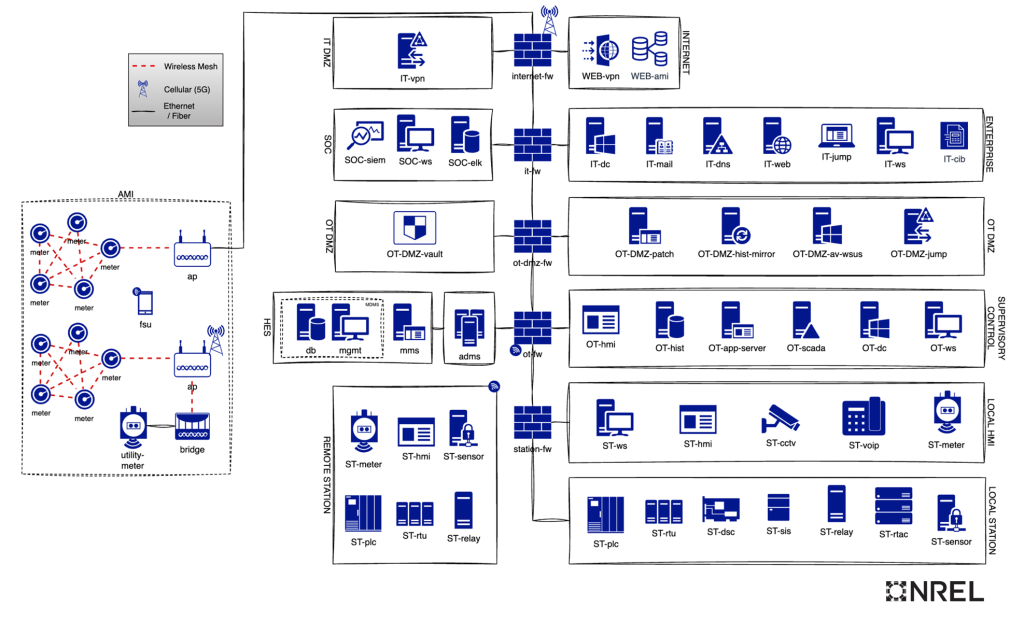
|
Zone / Area |
Typical Systems |
Scan Posture |
Agent Posture |
Policy Notes |
|---|---|---|---|---|
|
Enterprise |
IT servers, mail, DNS, jump hosts, workstations |
Normal authenticated scan possible |
Agent allowed |
Standard managed space. |
|
IT DMZ |
VPN, web, internet-facing systems |
Controlled scanning |
Restricted or allowed with controls |
Higher caution due to exposure. |
|
OT DMZ |
Patch mirror, jump host, WSUS, vault |
Limited / controlled |
Restricted |
Bridge zone. |
|
Supervisory |
HMI, historian, app server, SCADA |
Cautious, role-based |
Restricted |
Industrial context. |
|
Local HMI |
Workstations, HMI, CCTV, meter, VoIP |
Limited |
Restricted |
Mixed asset types. |
|
Local Station |
PLC, RTU, relay, sensor, TAC |
Limited / manual |
Often prohibited |
Fragile or operationally sensitive. |
|
Remote / AMI |
Meters, access points, bridges, field devices |
Limited / remote constraints |
Often prohibited or special |
Ownership/connectivity issues. |
8. Evidence Sources
8.1 Accepted Evidence Sources
|
Evidence Source |
Used For |
Strength |
Limitations |
|---|---|---|---|
|
Manual intake |
Owner, role, purpose |
Medium |
May be incomplete. |
|
Inventory record |
Identity, owner, lifecycle |
Medium / High |
May be stale. |
|
Provisioning source |
Build source, platform, tags |
High |
Only available for managed assets. |
|
OSQuery or equivalent |
Host facts, software, configuration |
High |
Requires agent/query capability. |
|
Authenticated scan |
Vulnerabilities, OS, services |
High |
May not be safe for all systems. |
|
Cloud metadata |
Instance identity, tags, region |
High |
Cloud-only. |
|
Owner attestation |
Business role, restrictions |
Medium |
Requires trust in owner. |
|
Vendor documentation |
Support limits, allowed changes |
High |
May be generic or outdated. |
|
Vulnerability scan result |
Exposure and weakness |
High |
Depends on scan posture. |
|
Network observation |
Presence, traffic, relationships |
Medium |
Passive and inferential. |
|
Support contract notes |
Vendor restrictions |
High |
Must be maintained. |
8.2 Evidence Confidence
|
Confidence |
Meaning |
|---|---|
|
High |
Multiple reliable sources agree. |
|
Medium |
Evidence is plausible but incomplete. |
|
Low |
Evidence is sparse, stale, or indirect. |
|
Unknown |
Evidence does not support a decision. |
9. Output Model
Each assessment should produce a structured result.
9.1 Required Output Fields
|
Field |
Description |
|---|---|
|
Asset ID |
Unique identifier. |
|
System name |
Human-readable name. |
|
Owner |
Accountable owner. |
|
Requested role |
Declared function. |
|
Machine type |
Classification. |
|
Network zone |
Diagram or discovered location. |
|
Readiness status |
Approved, Review Required, Rejected, etc. |
|
Scan posture |
Normal, controlled, limited, passive, manual, prohibited. |
|
Agent posture |
Allowed, restricted, prohibited, exception required, etc. |
|
Confidence |
High, Medium, Low, Unknown. |
|
Findings |
Key observations. |
|
Limitations |
Known restrictions. |
|
Recommendations |
What should happen next. |
|
Exception required |
Yes / No. |
|
Expiry / reassessment date |
When this decision must be reviewed. |
9.2 Example Output Summary
System:
Machine type:
Owner:
Zone:
Readiness status:
Scan posture:
Agent posture:
Confidence:
Recommendation:
Exception required:
Reassess by:
10. Exception Model
10.1 Exception Required When
An exception is required when:
- Evidence is incomplete but onboarding is requested
- The system violates normal readiness rules
- Scanning is normally prohibited but requested
- Agent installation is normally prohibited but requested
- Vendor restrictions conflict with operational needs
- Business criticality overrides normal technical policy
- Operational safety requires special handling
10.2 Exception Record
|
Field |
Description |
|---|---|
|
Exception ID |
Unique identifier. |
|
Asset / system |
Affected system. |
|
Policy rule |
Rule being excepted. |
|
Reason |
Why exception is needed. |
|
Risk |
What risk is accepted. |
|
Compensating control |
How risk is reduced. |
|
Approver |
Accountable approval authority. |
|
Expiry |
Date exception ends. |
|
Review cadence |
How often exception is reviewed. |
11. Test Plan
11.1 Test Plan Purpose
The test plan verifies that the policies produce consistent, explainable, and useful decisions.
The goal is not to test software first.
The goal is to test the decision framework.
11.2 Test Scenarios
|
Test ID |
Scenario |
Input |
Expected Readiness |
Expected Scan Posture |
Expected Agent Posture |
Pass / Fail |
|---|---|---|---|---|---|---|
|
TST-001 |
Standard managed server |
Owner, inventory, OS, zone known |
Approved |
Normal authenticated |
Agent allowed |
|
|
TST-002 |
Unknown device |
No owner, unknown role |
Unknown / Review Required |
Prohibited |
Prohibited |
|
|
TST-003 |
Legacy production server |
Owner known, old OS, fragile dependency |
Approved with Limitations / Review Required |
Controlled / limited |
Restricted |
|
|
TST-004 |
Vendor appliance |
Vendor restrictions documented |
Review Required / Exception Required |
Manual / limited |
Prohibited |
|
|
TST-005 |
OT PLC |
Safety-sensitive field device |
Review Required |
Manual / passive |
Prohibited |
|
|
TST-006 |
Cloud instance with tags |
Owner and metadata known |
Approved |
Metadata/authenticated |
Agent allowed or controlled |
|
|
TST-007 |
Internet-facing DMZ host |
Exposed web system |
Approved with Limitations |
Controlled |
Restricted or controlled |
|
|
TST-008 |
Short-lived container |
Image and platform metadata available |
Approved by platform evidence |
Image/runtime scan |
Platform-dependent |
12. Test Box Requirements
12.1 Test Box Matrix
|
Test Box ID |
Machine Type |
Zone |
Owner Known? |
Role Known? |
Evidence Available |
Expected Readiness |
Expected Scan Posture |
Expected Agent Posture |
Notes |
|---|---|---|---|---|---|---|---|---|---|
|
BOX-001 |
Standard IT server |
Enterprise |
Yes |
Yes |
Inventory + scan |
Approved |
Normal authenticated |
Allowed |
|
|
BOX-002 |
Legacy server |
Enterprise |
Yes |
Yes |
Inventory + owner notes |
Review Required |
Controlled |
Restricted |
|
|
BOX-003 |
Vendor appliance |
DMZ / OT |
Yes |
Yes |
Vendor docs |
Exception Required |
Limited/manual |
Prohibited |
|
|
BOX-004 |
PLC / RTU |
Local Station |
Yes |
Yes |
Manual + diagram |
Review Required |
Passive/manual |
Prohibited |
|
|
BOX-005 |
Unknown device |
Unknown |
No |
No |
Network observation only |
Unknown |
Prohibited |
Prohibited |
|
|
BOX-006 |
Cloud VM |
Cloud / Enterprise |
Yes |
Yes |
Metadata + tags |
Approved |
Authenticated/cloud |
Allowed/controlled |
13. Open Questions
|
Question |
Owner |
Priority |
Due Date |
Resolution |
|---|---|---|---|---|
|
Who approves exceptions? |
||||
|
What evidence is mandatory for each machine type? |
||||
|
Which zones allow authenticated scanning? |
||||
|
Which systems prohibit agents by default? |
||||
|
How long does readiness status remain valid? |
||||
|
What is the minimum output required for onboarding? |
14. Approval
|
Role |
Name |
Approval Date |
Notes |
|---|---|---|---|
|
Business Owner |
|||
|
Technical Owner |
|||
|
Security Owner |
|||
|
Operations Owner |
|||
|
Policy Owner |
The key distinction is this:
Policy A decides eligibility.
Can this system be admitted, trusted, onboarded, or included?
Policy B decides touchability.
Can we scan it, query it, install anything, or must we keep our grubby little automation paws off it? 🦝
The BRD angle gives you exactly the missing spine: purpose, requirements, evidence, decision rules, outputs, exceptions, and test cases. That keeps the real ideas alive instead of turning them into decorative formatting moss.